


Workforce planning software for your yearly manning budget
Every budget season, HR and Finance agree how many people each position may have and what they may cost. Stavis keeps that number as an approved yearly plan and compares it with the people actually on payroll every month. Managers see what is left before they open a vacancy.
What you can do
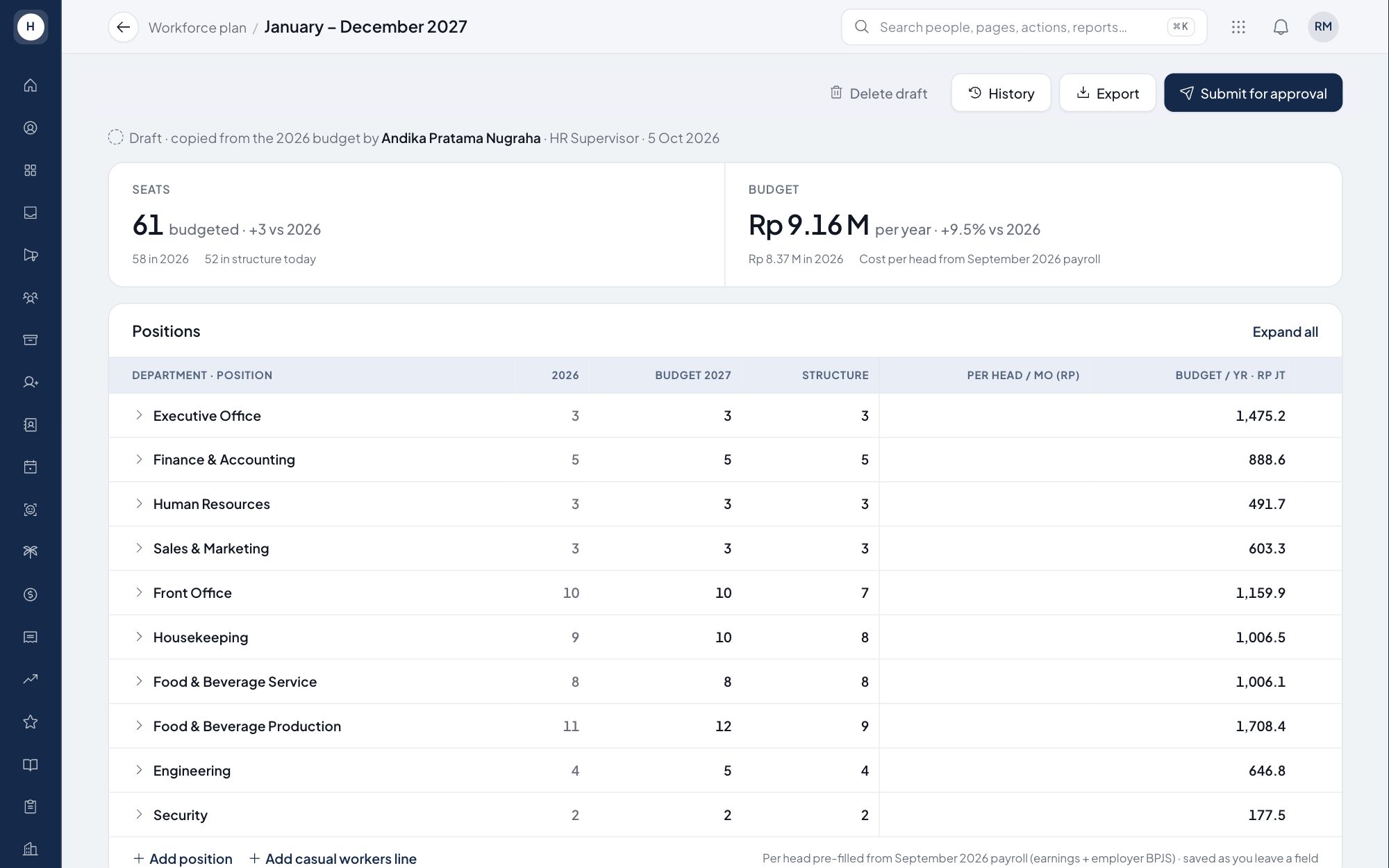
Budget per unit and position
Each plan line holds a unit, a position, a headcount and a monthly cost per head. Cost is pre-filled from the latest payroll average, including company BPJS, and HR can change it.
Submit and approve
A plan moves from Draft to Waiting approval to Approved through the company approval workflow. Revisions to an approved plan need a reason, and the old number stays in force until the revision is approved.
Vacancies from the plan
A line with seats left shows a button that opens a recruitment request with the unit and position filled in. A request above budget can still be submitted, is marked over budget and needs a reason.
Plan vs actual and hiring freeze
The Trend tab shows monthly headcount and actual cost against budget for the company, a department or a single position. HR can freeze hiring on a position and record why.
How it works
- 1
Draft the plan
Start from today's org structure or copy last year's budget, then add or remove lines as needed.
- 2
Send it for approval
HR submits the draft to the approvers set in the approval workflow, for example the General Manager. A rejection returns it to draft with a note.
- 3
Track it all year
See budget, filled and remaining per position, open vacancies from lines with seats left, and export to Excel in a manning guide layout.
Frequently asked questions
What is a manning budget in workforce planning?
A manning budget is the headcount and cost per position agreed for one fiscal year. In Stavis it is built per unit and position and approved before it takes effect.
How do I compare budgeted headcount with actual headcount?
The Budget tab shows budget, filled and remaining per position. The Trend tab shows actual headcount and cost per month against budget from January to December.
Does the system block vacancies that go over budget?
No. It shows a warning and asks for a reason, then marks the request over budget so it can follow a longer approval chain.
Can I export the workforce plan to Excel?
Yes. The Budget tab exports to Excel with a sheet per department, counts per position, total headcount and a prepared, checked and approved footer.
See Stavis with your own company
Bring one department, one shift pattern and one month of payroll. We will walk through it with you.
